
Another Fusion 360 Problem

Kev T

Western Thunderer
This one is driving me daft and I can't find a solution neither online nor through trial and error.
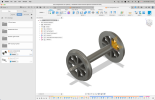
Screenshot 2025-04-15 at 17.19.35.png


In the screenshot you can see I've made a drawing called loco components. Under here I've drawn some components for a wagon I'm drawing in another folder. The idea being that I can just pull in pre-drawn components save redrawing them. Note no problems with the timeline.
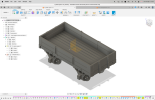

Screenshot 2025-04-15 at 17.24.39.png


Above is the wagon I'm drawing and no matter what I try I can't get the axles in without multiple problems. Problems are things like lost plane reference or just compute failures. Hence all the yellow in the timeline.

I've tried making the axle a standalone component; copy/pasting the wheels group and copy/pasting the whole component group. Note that there aren't any links between the wheels components and the components above that group.

Please help my greying thinning hair

Kev
 

NickB

Western Thunderer
Rather than copy/pasting, have you tried inserting the components into your wagon design? Open the wagon (without wheels), then go to the list of designs on the left hand side of the screen, find the component to insert, right click on it and insert it into the current design. Most likely you will then have to move it to the correct point in the wagon design.

That procedure keeps the inserted component as a separate, integral part. Pasting tries to integrate the new component with the design, which includes not just the component itself but also the "behind the scenes" data such as origin, reference planes and such like. Inserting is generally preferred to copy/paste.

Nick
 

John Duffy

Western Thunderer
From your component, select the body you require, then use Create to create a Derive. Use the drop down options to add that body into and existing design (the destination drawing). It will then be available to move and reposition.

John
 

ianlbsc

Western Thunderer
Click 'Insert' and 'Derive'. Pick the previous component that you wish to add to the current drawing from wherever you have it saved. This will then go to that drawing, allowing you to select it all or just one body part of it, and once selected, will then appear in the current drawing. You can then move it - as a component - to where you want it. Then 'capture position' icon and it will stay there.
Cheer, Ian
 

simond

Western Thunderer
Rather than copy/pasting, have you tried inserting the components into your wagon design? Open the wagon (without wheels), then go to the list of designs on the left hand side of the screen, find the component to insert, right click on it and insert it into the current design. Most likely you will then have to move it to the correct point in the wagon design.

That procedure keeps the inserted component as a separate, integral part. Pasting tries to integrate the new component with the design, which includes not just the component itself but also the "behind the scenes" data such as origin, reference planes and such like. Inserting is generally preferred to copy/paste.

Nick
That would certainly be the appropriate method (in most cases) in Solidworks.

However, be aware that updating a component part will normally update every assembly which contains it (with provisos, but in general)
 

Kev T

Western Thunderer
Gents
many thanks for the info. Both methods have worked well. :D Hairlessness now avoided.

I notice that the insert into current drawing will move all of the components from the drawing, you then have to delete the components you don't want. This method moves the origin and sketches over.
Insert and derive only moves the body you want to copy over without the sketches and origin.
I can't see any particular advantage in either method, but I wonder if the insert into current design will alter the inserted component with any changes to the original drawing?

Kev
 

John Duffy

Western Thunderer
Gents
many thanks for the info. Both methods have worked well. :D Hairlessness now avoided.

I notice that the insert into current drawing will move all of the components from the drawing, you then have to delete the components you don't want. This method moves the origin and sketches over.
Insert and derive only moves the body you want to copy over without the sketches and origin.
I can't see any particular advantage in either method, but I wonder if the insert into current design will alter the inserted component with any changes to the original drawing?

Kev
Once into your active project you can break the link (right click on the body in browser), thereby preventing any updates to the source carrying over into the derived parts.

John
 
Top