Head scratching etch artwork

Phil O

Western Thunderer
Hi All

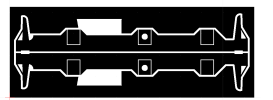
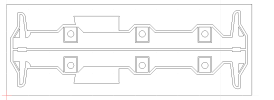
I'm scratching my head over this, I have drawn up the outline for a set of frames, but only the axle holes for the centre drivers come out, the outer axle holes hatch, when they shouldn't.Frames 1.pngFrames 2.png Any suggestions welcome, as I've not had this problem before. It must be some sort of operator error, but what?

 

Mike Trice

Western Thunderer
A lot depends on what software you are using and whether the rectangle and axle hole are seperate objects that need combining in some way.

I found the safest approach to fills is to construct the hornblock areas like this:
fill.jpg
In practice the two vertical edges at the top are positioned over each other so when the shape is hatched is appears as a solid area. Hope that makes sense.
 

Phil O

Western Thunderer
I'm using QCAD, you select the circle icon, decide which method you want to draw it, I used radius and centre, click the icon for how you want to position it and then place it in positions you want it.
 
Because different programs may use different terminology, I suggest the problem is likely to be related to “processing order”. Is the rectangle reproduced (not drawn) before the circle or the circle before the rectangle? I’ve often been caught out by this! Cure will probably be commands like “bring to the front” or “send to the back”.
 

Mike Trice

Western Thunderer
All of the above might work for a particular drawing package and appear correct on screen, however there is no guarantee it will work when exported and sent to an etcher. The method I showed above should always work.
 
Top