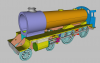
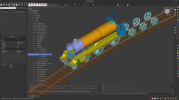
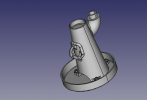
Being curious about FreeCAD, I downloaded it and attempted to draw a sand dome using the method as described in post #25 at the thread
Solidworks
Despite the huge difference in the way these two programs function, it didn't take too long to create a 1/4inch thick plate base segment, draped 'saddle-like' on the boiler, and then the two
closed Profiles sketched for
Lofting the sand dome skirt, sweeping 90degrees around from the top of the boiler to where it slopes down furthermost on the boiler side.
However, I couldn't persuade the
Lofting action to follow the curvature of the
Guide Rails installed. The
lofting always went directly across in a straight line from one
Profile to the other.
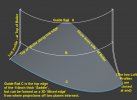
Then after viewing this tutorial
by Shawn Hymel ("DigiKey");
I installed the two program addons, '
Curves' and '
Curved Shapes' and converted some lines ex the Loft profiles into
Bsplines - and used the '
Gordon' surface tool to generate the initial area of
Surface (portion at left as below). This was
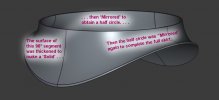
thickened slightly (by 1/4inch which presumably changed the
Surface into a '
Solid'?). First use of the
Mirror tool then yielded half the base for the sand dome, then after Mirroring all of this again, got the full 360° neatly shaped skirt.
[ Boiler dia is 38.5", sand dome dia. is 23.5" All 'Solids' are 1/4" thick, Lofting Profiles are 1/4" wide ]
As Mr Hymel explained in his video, some of the tools described are a bit erratic as to whether they will work or not. FreeCAD, has certainly advanced, but I wouldn't recommend its use for organic shapes. I sense that tinkering with it might easily become addictive - and a hobby within itself.
My itch has been scratched - and I'll scuttle back to other softwares now. I haven't used SolidEdge before either, but that may well be the
best free and competent CAD package. I avoid AutoDesk products because of past shenanigans where company profits, tax avoidance and executive payouts were more important than, and impacted customers.
-Brian McK.