FreeCAD

adrian

Flying Squad
My itch has been scratched - and I'll scuttle back to other softwares now. I haven't used SolidEdge before either, but that may well be the best free and competent CAD package. I avoid AutoDesk products because of past shenanigans where company profits, tax avoidance and executive payouts were more important than, and impacted customers.
Thanks very much for that - I will watch the video and have a session with curves.

I've not tried SolidEdge for CAD mainly because I don't have a Windows computer. For me QCAD is the best free cross platform, Apple OSX and Linux, 2D CAD. The free version locks the new layer generation after 15 minutes or so so all you do is plan in advance the layers you'll use and create them at the start or restart the application when a new layer is required. I was that happy with it's capabilities and updates that it's one of the very few applications where I have actually upgraded to the paid version.
 

John_B

Western Thunderer
As Mr Hymel explained in his video, some of the tools described are a bit erratic as to whether they will work or not. FreeCAD, has certainly advanced, but I wouldn't recommend its use for organic shapes.
I think I'm on my third attempt to learn FreeCAD, and this time it's finally working, but I haven't got to this level yet! I wish there were model railway specific videos about doing stuff like this!

It's a shame that he used v1.0 RC1, and also mentioned 0.22 at one point, when v1.0 had been out for some time when the video was uploaded a month ago. When he mentions bugs and workarounds that leaves uncertainty about whether they've been fixed in the latest release. It's hard enough getting my head round this, without that extra complication!
 

Chris Veitch

Western Thunderer
I think I'm on my third attempt to learn FreeCAD, and this time it's finally working, but I haven't got to this level yet! I wish there were model railway specific videos about doing stuff like this!

It's a shame that he used v1.0 RC1, and also mentioned 0.22 at one point, when v1.0 had been out for some time when the video was uploaded a month ago. When he mentions bugs and workarounds that leaves uncertainty about whether they've been fixed in the latest release. It's hard enough getting my head round this, without that extra complication!
It’s good to see someone else getting to grips with FC - I’ve been using it quite a lot in the last few months, albeit for pretty simple stuff, and I think I’m starting to get comfortable with it now for basic tasks although it’s taken a long time and a bit of trial and error. I’ve not tried anything like the lofting exercises shown here although I’ve had some “fun” (i.e. pain and heartache) with extruding tapered complex shapes.

If I can offer any advice to the budding FreeCADer it would be:
  1. Upgrade to and stick to the current stable version, i.e. currently V1.0;
  2. If you’re stuck on a specific tasks try posting a query to the FreeCAD forum. Like most such groups it doesn’t suffer fools but I’ve always had answers very quickly and from some very knowledgeable people, sometimes those involved in its current development;
  3. Have a good look at Darren Stone's MangoJelly YouTube channel of FreeCAD tutorials. He has a huge amount of material including:
    1. A step-by-step tutorial for V1.0 in continual development and currently up to 35 parts;
    2. Regular updates on the development status and features coming through from the nightly builds, with video demonstrations of these.
Hope this helps.

Edit: the FC forum is currently extremely slow, possibly under attack from thousands of AI crawler bots as discussed on a few other threads here recently. However it is worth the wait if you can get to it.
 
Last edited:

John_B

Western Thunderer
Adventures in creation is another good YouTube channel. He's doing a series on v1.0 too. But it will be out of date soon as v1.1 is on the way with some big changes!
 

Brian McKenzie

Western Thunderer
The machinations of manipulating this increasingly capable software, as demonstrated here would interest me,


if I hadn't already been spoilt by the relative ease of draughting same with its commercial competitors - several of which have a free version (or nearly so).

I feel as though something has been taken from me, as I would enjoy beating FreeCAD into submission - similar to doing cryptic crosswords :) .

-Brian McK.
 

Stephen Freeman

Western Thunderer
Well I have version 1.00 installed just need some time. I am not sure but I think v1.1 is already available but Beta. All I know is that it is constantly changing or so it seems.
 

Chris Veitch

Western Thunderer
Well I have version 1.00 installed just need some time. I am not sure but I think v1.1 is already available but Beta. All I know is that it is constantly changing or so it seems.
The latest source is always available from GitHub and the weekly builds are linked on the Downloads page, but the same page clearly states they can be trialled by advanced users but they’re not suitable for production use. It is constantly changing (i.e. it’s in development) but that’s the nature of open source - it’s open to all to see what’s going on. Version 1.1 will eventually go to a “release candidate” (RC) version which the developers consider suitable for final release and then on to a formal release.

if I hadn't already been spoilt by the relative ease of draughting same with its commercial competitors - several of which have a free version (or nearly so).
It’s the “nearly so” bit that prompted me to move from FreeCAD's commercial competitors with their rather opaque trial/home user/education/non-commercial licences and insistence on (sometimes public) cloud storage, once I became convinced of FreeCAD’s capabilities. I’ve recently moved and converted the few models I had on Fusion 360 to allow me to ditch AutoDesk.
 

Stephen Freeman

Western Thunderer
Well I have Turbocad 2015 Deluxe, which I use for 2D but seemed a bit difficult to do 3D with it, though it is possible, Freecad seems easier somehow.
 

adrian

Flying Squad
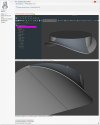
I installed the two program addons, 'Curves' and 'Curved Shapes' and converted some lines ex the Loft profiles into Bsplines - and used the 'Gordon' surface tool to generate the initial area of Surface (portion at left as below). This was thickened slightly (by 1/4inch which presumably changed the Surface into a 'Solid'?). First use of the Mirror tool then yielded half the base for the sand dome, then after Mirroring all of this again, got the full 360° neatly shaped skirt.
Again thanks for posting that - I was going to have a go this weekend unfortunately the curves addon/workbench are only available for Intel x86_64 machines - not currently available for Apple Silicon. I'll have to try my Linux box but it did say no amd64_e packages so I'm not that hopeful.
 

Chris Veitch

Western Thunderer
I posted recently in the Garelochhead thread about a blog post regarding refining 3D models for FDM printing which extensively featured examples drawn in FreeCAD and would possibly have been better off posted here - it examined the engineering principles around this type of additive manufacturing in detail and contained some very interesting material. The author has now published a FreeCAD Addon to automate the application of some of these principles which is detailed and summarised here, and which might be of interest to increasing numbers on this forum given the rapidly improving capabilities of FDM printers.
 

adrian

Flying Squad
Just to highlight that FreeCAD 1.1 has just been released, FreeCAD: Your own 3D parametric modeler

There have been a significant number of updates, much more than the small point 1 upgrade would belie.


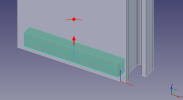
One change immediately apparent on the very first thing I tried this morning was padding (extruding) a sketch which was completely hidden by the main body I had previously drawn, the new pad appearing as a translucent green shape inside the main body. Things certainly seem to be crisper and clearer with the update.

Screenshot 2026-03-26 at 08.02.39.png
 

Stephen Freeman

Western Thunderer
Sounds like it is worth updating, as long as there are no "negative improvements". There are some little niggles that currently seem unnecessarily tricky to overcome. On the whole I love it!
 
Top