Part 2 – Computer Control
One of the advantages of using Computer Control as part of operating a Model Railway, is that the computer can do as much or as little as you want, whilst you and/or a team of friends, can choose to operate only the parts of the layout that you want to operate.
For instance, you could just sit back and watch as the computer ran the whole show, as it can easily run trains to a complex timetable, and do so whilst applying the principles of absolute block, along with operating all the points and signals accordingly.
You could also choose to drive a locomotive in the above scenario, since as long as you obeyed all the signals set by the computer (which would also continue to run the rest of the railway), there would be no collisions.
Another scenario, would be for a team of operators to drive all the locomotives, whilst the computer set routes and operated all the signalling, or, if this scenario were reversed, the computer would run all the trains, but would have to obey the signals that were set by you and your team.
It is a variant of this last method of operation, that is closest to the way in which I’ll be running my railway. This is how it might work:
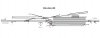
Firstly, if you were stood at the location of Millers Dale signal box on the layout, directly in front of you would be a ½ size 20 lever frame, with a block shelf above you at about eye level. This would contain two sets of Midland block instruments for both up and down lines, along with their respective bells and tappers, and finally, above that, there would be this Signalling Track Diagram hung on chains from the ceiling:
A couple of yards away to your right, there would be a low table with a controller on it for shunting / re-marshalling trains, along with a ¼ size 5 lever ground frame for operating the point work in the yard.
To your left, and again, mounted at eye level, there would be a District Diagram, something akin to this one for Buxton District that I posted earlier in the thread:
The main difference between this one and the one I’m now referring to, is that this new one would show both the Up and Down main lines, and be divided up into block posts and their respective block sections, so as to show the position and movement of trains throughout the district.
The following describes the way in which this signal box would be used to operate the railway at Millers Dale:
The time on the railway is just after 8.30 in the morning, and a glance at the District Diagram, shows 3 trains at various places in the district. The 7.48 Sheffield to Buxton Passenger Service is just approaching Edale on the Dore and Chinley Down line, whilst the 6.45 Derby to Manchester Central Express has just passed Bugsworth, and is about to leave the district on it’s way to Manchester.
However, the train that particularly interests you, is the 7.15 Derby to Manchester Slow, that’s now just leaving Hassop on the Down line, and heading in your direction as it continues towards Longstone. Sure enough, after a few moments you receive a single beat (call attention) on the bell from Monsal Dale, and on answering it, you get the expected 3-1 for the ‘Slow,’ which you accept by repetition, and turn your block instrument to ‘Line Clear.’
There’s no need for you to bell this through to Millers Dale Junction, as you will need to shunt this train for the following 5.15 St Pancreas to Manchester Central Express, which will be hard on it’s heals. You also leave your down home signal, ‘On,’ as you want to be able to check the train’s speed as it approaches.
Another couple of minutes pass, and a further glance at the district diagram, shows that a new train has appeared, just leaving Buxton, and currently passing Ashwood Dale Sidings. At first you think that it’s the 8.50 Buxton to Millers Dale Turnabout, setting off 10 minutes or so too early, but a quick rifle through the WTT, confirms it to be the 8.45 Buxton to Sheffield Express. You note that it’s opposite number, which you’d previously seen approaching Edale, is making good progress, and is about to join the Peak Up Line at Chinley South Junction, whilst your Down Slow is now just approaching Monsal Dale.
Two beats on the bell from Monsal Dale confirms that the slow is now entering your section, and after repeating it, you change you instrument to Train on Line. A couple more minutes pass, and then suddenly, with a rush of sound and movement, the ‘Slow’ steams into view across the viaduct, and after it’s exhaust beat dies to a coast, and a couple of pop whistles, you reverse your home signal and watch as this Crimson Lake beauty seems to glide past the station buildings, before coming to a gentle stand in the Down platform.
You protect the train by returning lever 19 to the frame, but don’t give ‘Train Out of Section,’ as the presence of the train in the platform is still fouling the Down Home clearing point.
Suddenly, another single beat on the bell, interrupts your admiring gaze on the newly arrived train, but this time, it’s higher tone tells you it’s from Millers Dale Junction SB, and after repeating it, you get a 1-3 for the 8.50 Buxton ‘Branch Passenger’ Turnabout. You accept the train by repetition, and turn the relevant instrument to line clear.
A pop whistle from the ‘Slow,’ informs you that it’s now ready to draw forward, so that it can shunt it’s train into the down bay. You reverse lever 18 - the Down Starter, and another pop whistle acknowledges the signal, and slowly it starts to draw forward past the box.
Ting, ting – 2 beats from Millers Dale Junction tells you that the Buxton train is entering section, so you repeat the code, and change your up instrument to Train on Line.
Once the down slow has past the bay point work, you return lever 18 to the frame, reverse 12, and give ‘right away’ to the driver for the train to be propelled inside. As soon as the loco is clear of the bay point work, you sharply return lever 12 to the frame, and then tap out 2-1 (Train Out of Section) to Monsal Dale and return the instrument to Line Blocked.
However, Monsal Dale immediately returns with 4 beats for the Down 5.15 Express, which you accept by repetition, and return the instrument to line clear. You then call attention to Millers Dale Junction, and after a reply, you offer the express on with 4 beats. The Express is accepted, and you see the repeater for Millers Dale Junction flick to Line Clear, at which point, you clear all your down signals by reversing levers 19, 18, 16 and finally the distant at 20 in that order, so as not to check the approaching train.
Another pop whistle from your left, and the Buxton Branch train steams into view around the curve, and you lower your home to allow the train to continue it’s approach. Two beats again from Monsal Dale for the express ‘Entering Section,’ and you turn your instrument to Train on Line, and then 30 seconds later, you return your Up Home to ‘On’ by placing lever 2 back in the frame, which now protects the Buxton train which has come to a stand in the Up platform.
Another quick glance at the District Diagram, and things are starting to liven up no end, with no less than 8 trains now making their way across the district in various directions, and that doesn’t include the 3 that are currently being dealt with by you. However, you don’t have long to dwell on this, as a shrill long crow whistle announces the arrival of the Midland Express. She’s a double header, and the safety valves of the two engines lift in unison as their drivers ease off on their regulators, the upward rush of steam, being caught like a glistening fountain in the sunlight as they rumble powerfully across the viaduct, and ease majestically up to the Down Starter.
Sorry about that, I think I may have pushed the boundaries of poetic license to new heights there a bit!!

Anyway, pretty much all of the above is actually possible using DCC and Computer Control, and how to do it, is what I've been working on using my 'test track' layout as I mentioned in my OP. I hope you found it interesting, and not too heavy going.
Mike
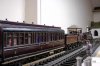
NB: The 2 photos of Midland stock, were taken on my original 'test track' layout, and I added them to try and break up the text a bit. They are not part of the hypothetical scenario I've described above.


Heh, ho.


 .
.






 .
.


