

TheSnapper
Western Thunderer
About 6 years ago I installed a Loksound XL v3.5 in a Heljan Hymek, and posted the details on the (now defunct) MIG0 Forum. This was copied over to this forum - see Posts #1 & #2 here.
It worked OK, and with subsequent amendments to the wiring, and suitable CV changes, I was able to switch the red lights independently.
I have to admit that despite the wiring mods to the PCB being sanctioned by Heljan, they are a bit messy & look” unprofessional”. Nevertheless, it worked, so I did the same modifications for my Heljan Class47, which has exactly the same board. (The newer Heljan locos have a different PCB; I’m not sure with which model they changed).
Incidentally, the wheel profile also has changed with the newer models. Both my ’47 wheels & this Hymek’s wheels have been superbly re-profiled by Colin Dowling (eastsidepilot of this parish). Also the motors don’t seem to be so “power-hungry”. For instance, I have successfully used a Zimo645 in a Class 31 and a Class20. However, I have since replaced the decoder in the ’31 with a ZimoMX695KV, and I have removed one of the motors and the flywheel from the ’20…..but that’s another story
Anyway, back to the topic: The ’47 remains in pieces – I have a habit of reducing Heljan models to kit-form! .My excuse is that it’s awaiting the application of a full detailing kit from MMP. Also, since I bought it, I have gone over completely to Zimo decoders for various reasons. I think they have better motor control, a better manual, and are better value. Not to mention, some great sound projects available from Digitrains & especiallyPaul Chetter (eg the LNER A4/A3 is superb…). No connection, just a satisfied customer.
Nowadays, I’m not really bothered about working lights or fans, so I tend to disconnect them completely (isn’t the Heljan fan awful – so NOISY). However, I was asked by a friend to install sound into his Hymek, and he asked if I could replicate my installation. (BTW, I no longer have my own Hymek)
I would have liked to try the method as described beneath mine in Post #3 here, but couldn’t source the Heljan-style connectors. I even contacted Heljan, hoping they would sell or give me a small quantity, but they could only offer to sell me 10,0000! So I took the lazy way out and decided to use the already-prepared Heljan PCB from my ’47, together with my favoured Zimo MX695KV instead of a Loksound XL. I say “lazy way out”, because it meant that I wouldn’t need to do any rewiring or fitting series resistors for the LED’s!
To cut a long story short, I am indebted to Paul Chetter, via RMWeb, for his help in achieving independent Red Light switching using Swiss Mapping on the ZimoMX695. To be quite honest, it is a section of the Zimo manual I have ignored in the past, as I wrongly assumed it applies only to Swiss loco lighting! How wrong I was! It has enormous potential being so simple to configure, compared with the struggle I had trying to do the same for another installation using the Loksound XLv.4
Paul said:
Decide which F Key you wish to operate the red LEDs. Since this action will be infrequent in comparison to playing various sounds etc, I suggest you use a high F key which does not already have a sound or function assigned, say F22. The actual one used is irrelevant, but I'll use this as an illustration.
So, if you know which Function Outputs are connected, and which F key you wish to use:
CV430 = X (where X is the number of the F key, in this case F22, so CV430 = 22)
CV432 = Y (where Y is the number of the Function Output you wish to operate in the forward direction, in this case FO1, so CV432 = 1)
CV434 = Z (where Z is the number of the Function Output you wish to operate in the reverse direction, in this case FO2, so CV434 = 2)
PS, to add 'softstart' to all the lights, add 52 to the values in CVs 125, 126, 127 and 128.
Decide which F Key you wish to operate the red LEDs. Since this action will be infrequent in comparison to playing various sounds etc, I suggest you use a high F key which does not already have a sound or function assigned, say F22. The actual one used is irrelevant, but I'll use this as an illustration.
So, if you know which Function Outputs are connected, and which F key you wish to use:
CV430 = X (where X is the number of the F key, in this case F22, so CV430 = 22)
CV432 = Y (where Y is the number of the Function Output you wish to operate in the forward direction, in this case FO1, so CV432 = 1)
CV434 = Z (where Z is the number of the Function Output you wish to operate in the reverse direction, in this case FO2, so CV434 = 2)
PS, to add 'softstart' to all the lights, add 52 to the values in CVs 125, 126, 127 and 128.
I coupled up the modified Heljan PCB to the Zimo695, according to this diagram:
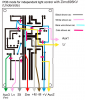
Then I configured the CV’s as he suggested. I even got the fan working on FO23 using “Swiss Mapping Group 2”, and tamed the speed (& noise) satisfactorily with a combination of on-board potentiometer adjustment & Function Output “dimming” (CV60).
And it all works.. I rate Swiss Mapping as "My Discovery of 2014"!
Tim


