Solidworks

adrian

Flying Squad
Trim all the lines so that you are left with a 90degree segment of the full skirt required. Ensure that these lines are properly connected to each other.

I think this maybe where I'm getting stuck - I have drawn the small radius at the top and the large radius at the side it's the loft bit that is complaining about the path.

Mirror this surface to go from 90degrees to 180degrees, then mirror all of that again to get the full 360degree wrap.
I will try that - again I think one of the problems I was making for myself was trying to loft the entire thing in one go. I like the idea of sorting out one quadrant first and then mirroring it.
 

paratom

Western Thunderer
Siemens Solid Edge Community Edition is free for life, and the only restriction is that you cannot share files to or from the paid-for versions. It is every bit as good as Solidworks and you get finite element analysis, full parametics etc. etc. It is the only 'professional' system were the free version is not a mugging into a paid for license. ... so far ... ...
OK there seems to be a few really good free CAD packages out there. In a vote I wonder which one would come tops. Haven't really looked into Solid Edge but what I have seen so far it looks like it would be a contender. My tick boxes would be, orthographic drawings that update when the model is changed, models that are easy to edit and the ability to export obj and stl files. Which ever packages we are using there are probably some tools we never use but I suppose it's better to have too many tools than not enough. With the combination of the latest 3D printers and available free CAD software scratch building is becoming more computer based and allowing people to create models that they would find impossible to scratch build.
 

Brian McKenzie

Western Thunderer
I think this maybe where I'm getting stuck - I have drawn the small radius at the top and the large radius at the side it's the loft bit that is complaining about the path.


I will try that - again I think one of the problems I was making for myself was trying to loft the entire thing in one go. I like the idea of sorting out one quadrant first and then mirroring it.
There are a couple of things I wrote that could do with correction or further explanation.
I don't know if FreeCAD makes use of 'surface' modelling tools, but that is what my suggestion amounts to.

For 'solid' modelling, both the loft sections, one on the front plane I.e. that with the small radius curve to the top of the boiler, and the second loft section - that incorporating the curve down the side of the boiler (on the right plane), will both need to have a line drawn down the centre axis of the dome, plus a horizontal line linking the lower end of the curved bits to join each axis line respectively.

A clumsy explanation, but do look back a few years in the CAD section where I did something similar (but not perfectly) for a loco chimney.
I'm a long way from home base presently, otherwise I'd put up some sketches.

-Brian McK.
 

Chris Veitch

Western Thunderer
I've been using FreeCAD to learn a little more on the 3D modelling side. So far I have managed with basic shapes and components reasonably okay where I've been adding and subtracting boxes and circles etc. However I've been struggling to get a satisfactory blend on the dome to the boiler from the tight radius at the top to a larger radius for the sides. I've tried some of the guides about lofting along a curve but can't seem to get a path defined for it to follow accurately. Any pointers to some useful guides would be appreciated.
I afraid I can't add any specific help, but I'm sure you're as familiar as I am with Darren Stone's MangoJelly video tutorials and it might be worth having a look at some of the v1.0 sessions if you're not up to date with them. It seems to have incorporated quite a few refinements compared to v0.2x, so is probably worth upgrading to if you haven't already. I moved to it a few weeks ago and haven't had many problems, although my subject matter is pretty simple. I have noticed that Darren's done a few ad hoc short sessions to answer specific queries, so it might be worth posing the question to him directly. He seems very well versed in the internals of FreeCAD and to be up to date with where the development process is heading.
 

Brian McKenzie

Western Thunderer
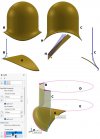
Dome Skirt using Solidworks.jpg

Now back on home turf from 'Genghis' territory (Taiwan), I had a look at assorted domes and chimneys prepared with older versions of Solidworks. Some of these ideas might be useful to Adrian and others working with FreeCAD, Solid Edge, Fusion 360 etc, and that shown here is a first attempt using newly installed SW2025.

While the the skirts on domes and chimneys can be shaped using variable radius fillets, the curvature coming off the side of a dome for example, where it sweeps down the side of the boiler, may not be a good prototypical match.

The construction method used here is to make a quarter segment of a dome (like slicing an apple into four pieces), mirroring the first segment to get half a dome, then mirroring all of that again - to complete the dome or chimney.

In the case of a dome, the rounded top is added separately later. A chimney can be done in one piece.

Start with preparing the base of a dome. The example A is a 1/4" thick plate that is draped over the boiler, and trimmed to diameter using a circular shape projected in the appropriate direction from the top plane. This piece, looking like the saddle on a horse, then gets three quarters of its surface trimmed away, leaving just a quarter of the 'saddle' remaining.

'Loft' profiles B and C are then prepared, with B going on the front plane (if you use the front plane for representing the side of the loco) and C being drawn on the right plane. Both these profiles are a continuous loop of lines and curves, not easy to see in the sketch, but the portion shown at H may help. These loops have a girth of only 1/4". Start by drawing a line down the side of the dome, then add in the required curvature to the boiler. Offset these lines inwards by 1/4", then join up the ends with lines 1/4" long.

Loft profile B will sweep around to Loft profile C. To get them to do that in a circular manner Guide Curves need to be added. These are shown at D and E. To draw these circles, you will need to create a plane for each at the required height off the Top plane. A third Guide Curve F is already present - being the top outer edge of the 'saddle' base.

Now we do the Lofting. With the Loft tool activated, select the two loft profiles B and C (these must both be closed loops - if not go back and check the geometry).

Where it asks for Guide Curves to be selected, click on D, E and F. All being well, you'll now have a Solid shape of a quarter of a dome.

But there is still one more thing to attend to - and it's always been annoyingly tucked out of sight with Solidworks.

In the Loft toolbox, expand Start/End Constraints. Fumble through the options, and under Start Constraint, choose "Normal to Profile". Further down, open up End Constraint and choose "Normal to Profile". What this does is to have the Lofting action from the planes of the two Loft Sketches to launch perpendicular from those planes.

Bravo, if you have got this far - you'll be able to manage the mirroring actions unaided :thumbs: .

-Brian McK.

NB. There is a way of having the thickness of the base of the skirt H better represented, twisting as it would - when coming down the side of the boiler - but that might require using Surface tools - which is all good fun.

 
Last edited:
Top