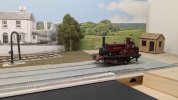
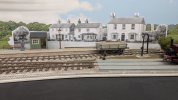
7mm Heybridge Basin

RichardG

Western Thunderer
My progress on Heybridge Basin probably seems funereal to many but the layout has got better over the last eleven months.

Progress remains slow because I keep on building model trains!

DSC_1624.jpeg
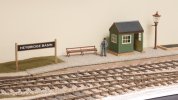
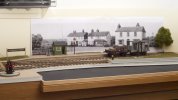
The scene on the platform at Heybridge Basin is taking shape. I am hoping, this is looks compact but not crowded. The camera lens is compressing things front to back.

The passenger entrance is beside the lamp. I am thinking of a fairly solid fence (close boarded) to frame this and pull everything together.
 
Backscene . . experiments and discussion

RichardG

Western Thunderer
But really, I have got to have an idea of the backscene before I decide on fences. A more open post and rail type might help to connect the scene onto the model.

P1050642.jpeg
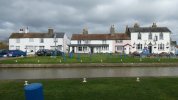
These buildings dominate the scene beside the navigation at Heybridge Basin. They were all there in the period of my layout. The railway is sitting along the area in front of the buildings with the cars and blue posts.

Heybridge_Backscene_2000x430mm_300dpi_Composed - WT.jpeg
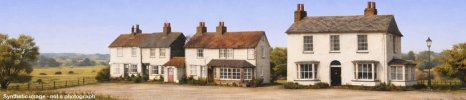
A mate has made this for me using ChatGPT. He has split the buildings apart and set them on a receding building line for artistic reasons. Various output filters are possible but this image is rendered in the style of John Constable. I rather like this! Hopefully, this scene can locate the layout at Heybridge Basin, and with a more open and less closed-in appearance.

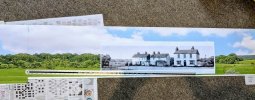
Here are two mock-ups using sheets of A4 paper taped together:

DSC_1799.jpeg
Option 1 (larger)

DSC_1800.jpeg
Option 2 (smaller)

I think Option 1 looks better in these photos and Option 2 looks better in my hobby room, which doesn't help much. The camera viewpoint is 150 mm below mine, and this doesn't help either but I am constrained by my tripod.

So if anyone can advise on how to choose the scaling factor for backscene buildings this would be a great help.

Edited 3 Feb 2026 to add watermark to AI-generated image
 
Last edited:

magmouse

Western Thunderer
So if anyone can advise on how to choose the scaling factor for backscene buildings this would be a great help.

The short answer is - you can’t. The slightly longer answer is, the photo, once printed, has an inherent correct viewpoint, from which the perspective will appear correct (effectively, where the camera was when the picture was taken). As you move away from this, the perspective will look increasingly distorted.

Using the photo as a backscene, the correct place to view the photo/backscene from becomes the only correct place to view the model from - fine for dioramas intended to be viewed from one place, but not so good for the typical model railway, where you want to look from many viewpoints.

Having said all that, there is a degree of latitude, depending on the contents of the photo. The kind of ‘three-quarter’ view you have tends to show up an incorrect viewpoint, while something like trees can be viewed from a wide range of angles and still look okay. Changes to the height you view from tend to be more problematic than changing the horizontal angle of view, so it could be a good idea to focus on making sure your backscene works from your preferred viewing height.

For what it’s worth, I think your second photo in your post above looks better than the first, in terms of the perspective and scaling. I also rather like what the AI has done - it feels more aesthetically compatible with the 3D modelling than the photo.

Nick.
 

RichardG

Western Thunderer
I suppose, errors in perspective are less obvious when the image is smaller and appears to be further away? Anyway, my second photo makes the scene look more spacious.

Heybridge Basin is supposed to be a test track, a place for model photography, and a learning project for 7mm scenic modelling. It is best for me to optimise the perspective for low level shots.

DSC_1802.jpeg
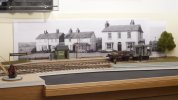
The perspective improves when the height of the viewpoint is closer to the location of the camera in the original source photograph. The inability to see the tops of the chimney stacks is more believable too. The black door on the front of The Old Ship (behind the brake van) is 28 mm tall, about 62% of scale height.

If a small open wagon like this will hide the hardstanding in front of the buildings, they will appear to be quite intimately connected with the railway but without hemming it in. So this size seems about right.
 

Osgood

Western Thunderer
That last picture looks really good, although it suggests a much greater distance from basin to buildings than the real thing.
But that alteration in itself makes the scene far more balanced (and believable for anyone not familiar with the location) than modelling it 'as is'.
But thats AI for you :))
 

Overseer

Western Thunderer
The window placement in the centre building bothers me. Why a window right in the corner and why a pair of casement windows together in the centre? It is unlikely for the time being portrayed. What is the logic of the protruding entrance bit between the houses? Does it protrude past the building line/property boundary? While you can do whatever you are happy with I would start with the actual buildings and strip back later porches, bay windows etc to take it back to circa 1900 condition then add filters to soften the image. I like the juxtaposition of the weatherboard houses hard up to the brick pub and think separating them loses something. I had better stop, the more I look at the AI images the more architectural anomalies I see, chimneys in odd places, odd gable ends.......
 

Yorkshire Dave

Western Thunderer
The smaller print is the better of the two giving some perceived distance and a better perspective as noted earlier. The larger print implies the right hand building is next to the siding.

As @Overseer suggests I would lose the buildings extensions' i.e. porches between the buildings, bay window brick extension on the centre building and the conservatory on the right hand building. They just do not look right nor are they in keeping with the period you're modelling.

In addition softening the image I would also fade it slightly (but not as far as Turner or Monet) so it does not dominate or detract the eye from the model.
 

RichardG

Western Thunderer
I am amazed with what the AI machine has created so far. I really like having the breaks between the buildings and this is something I would never been able draw on my own. I also like the visual balance which the illustration brings to the model.

What I was unsure about was how to choose the size of image. Thank you for the suggestions, I will go for the smaller dimensions.
 

RichardG

Western Thunderer
I had better stop, the more I look at the AI images the more architectural anomalies I see, chimneys in odd places, odd gable ends.......

As @Overseer suggests I would lose the buildings extensions' i.e. porches between the buildings, bay window brick extension on the centre building and the conservatory on the right hand building. They just do not look right nor are they in keeping with the period you're modelling.

Yes there are all sorts of curiosities in the AI image, but the overall impression looks good. I mean, the size and shape and arrangement of the buildings look as if they can enhance the layout and not dominate it and spoil it.

I want to work out how to fill in the rest of the scene before attending to detail errors.
 

RichardG

Western Thunderer
I had better stop, the more I look at the AI images the more architectural anomalies I see, chimneys in odd places, odd gable ends.......

WhatsApp Image 2026-01-31 at 19.31.24.jpeg
Yes the modeller of the modern scene has it easier with chimneys! Builders can place them almost anywhere, and frequently do. There's a block of flats in the village here where the chimney stacks are sitting in quite bizarre places, apparently in the middle of rooms and above stairwells.

But yes, these and other details can be worked up . . .

Heybridge_Backscene_500mm_300dpi WT.jpeg
This is the current draft of the buildings. There are detail changes from fenestration to the expulsion of the last bits of TV aerials. The rendering is now "photo realistic" instead of "John Constable" to help it blend into a commercial printed backdrop.

WhatsApp Image 2026-01-31 at 19.29.01.jpeg
This is another reason why I am so happy with the general composition. The print from ID Backscenes arrived today, and the image has a natural angle which ties in with the building line really well. Sometimes Lady Luck does come along with a big dollop of unexpected help.

I am still gathering up final corrections to the buildings image, these can go in at the end of next week.

Edited 3 Feb 2026 to add watermark to AI-generated image
 
Last edited:

RichardG

Western Thunderer
That last picture looks really good, although it suggests a much greater distance from basin to buildings than the real thing.
But that alteration in itself makes the scene far more balanced (and believable for anyone not familiar with the location) than modelling it 'as is'.
But thats AI for you :))

The layout has stayed visually balanced while it has evolved, quite an achievement really for something modular, and I want to preserve this balance after the backscene goes into place.

I haven't really thought much about believability, but it has got to be important for everyone, at least to some degree. If I put the buildings in their 'scale' location, the railway would be on the verge of needing to be a street tramway. Worse, the whole feel of the place would be really closed-in and claustrophobic, quite unlike the bare and open nature of the real place.

And so, "modeller's licence" comes in and the buildings go to a new place. David Jenkinson wrote about this better than I can in his book "Modelling Historic Railways", published by PSL. His arguments suggest, maybe I should really stop calling this "Heybridge Basin". Perhaps "Colliers Reach" for example. There's only a running-in board to change.

I have some original buildings. They are doctored and rearranged, but for me this is a whole lot better than something generic from the trade. Incidentally, the two pairs of cottages have become rendered instead of weatherboarded. I didn't ask for this, but I think it is a good thing. In my period, the weatherboarding had a dark, intrusive colouring. The rendering can be white or cream, or even Suffolk Pink. I haven't asked for the Suffolk Pink yet, it might shriek beside the green on the waiting shelter.
 

RichardG

Western Thunderer
That last picture looks really good, although it suggests a much greater distance from basin to buildings than the real thing.
But that alteration in itself makes the scene far more balanced (and believable for anyone not familiar with the location) than modelling it 'as is'.

I haven't really thought much about believability, but it has got to be important for everyone, at least to some degree.

I have always wanted the project to seem plausible. That's as far as I've tried to go. I leave the missing parts to my imagination.

It has dawned on me, the scene has got to be believable as well if it is to work at an exhibition. Thanks Tony.
 

RichardG

Western Thunderer
In my previous posts here I have used "backscene" rather loosely, to refer to the physical backdrop panel or to its illustration. So I have edited several older posts today to clarify where I am writing about the backdrop. This satisfies the inner nerd even if no-one else ever noticed.

. . .


Too late, I realised a modular layout needs multiple backdrop panels, one for each permutation of modules. To make a start, I bought a full 2.4 x 1.2 metre sheet of hardboard, and the timber merchant cut this into four strips for me.

There are plenty of warnings about hardboard warping. The first panel is now four months old and has kept its flatness. The material seems to be okay if you prime both sides, and use the right stuff to do the priming. Rustin’s MDF sealer and a decorator’s acrylic primer/undercoat have been successful. What did not work at all well was to try diluted PVA glue on one of the backs. I might as well have put the board out into the rain. So now I have three panels instead of four.

View attachment 228038
The second panel is long enough to serve Module B as well as the diorama board and its extension.

Although I am lucky to have my hobby room I do not have a workshop. So I cut the board to size in the kitchen and did this test fit in the living room. Then I painted the panel in the garden room and did the final fitting out in the hobby room.

View attachment 228042
The reinforcements are holding the panel flat above Module B.

View attachment 228041
The new panel drops into the slot in the extension (same as the first panel) so I only need one thumbwheel to hold it in place. Which is fortunate because this is the only thumbwheel I can reach when the layout is in its place in the hobby room.

View attachment 228039
I really like the overall effect here, I think the shape is easier on the eye and it makes the model look more interesting.

View attachment 228040
Nevertheless, this is taking me down a route to more woodwork, to enclose the fiddle yard. I really don’t want to tackle this yet.

There is also the matter of the illustration! I was terrible in art lessons at school, and I dropped the subject at 13. The breadth of modelling on WT does rather show how some projects excel in the artistic sides of things. I am far happier with a soldering iron than a paintbrush in my hand, so I think I will best live with the magnolia for a while.

I have "made" a few backscenes in my life, and my best effort was a collage of Peco sheets, some of my photos and minor infill with emulsion paint. So I am trying something similar for Heybridge Basin.

2026-02-02 09.21.51.jpeg
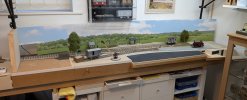
I have a new backdrop board, and hung the commercial backscene onto it.

2026-02-03 08.58.49.jpeg
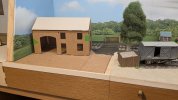
A possible farrier or blacksmith's. A two-storey building seems huge amonst the tiny huts and equally tiny trains. I do like the way the crossing gate can now be an entrance to a field. Far easier than a receding roadway.

2026-02-03 08.59.42.jpeg
If I use the blacksmith's building, the opposite end of the layout might need more to balance it. I would find an industrial building in low relief far easier than trying to represent estuarial scenery.

2026-02-03 09.00.58.jpeg
The higher ground here could suggest Wickham Bishop's hill or a mistake. I am pretty doubtful about this section, but Marion (whose eyeline is ten inches lower than mine) thinks it is just right.

2026-02-03 08.54.38.jpeg
The Bison Paddock is so small in this second draft of the buildings I know it will get lost. Which is a shame really.

The Old Ship looks like it is leaning over backwards . . . this is from distortion caused by the lens on the phone camera. The corners of the building and indeed the water column are true verticals.

The row of buildings can easily move 200 mm or so to the right. This completely alters the appearance of the layout! Visual balance moves to the diagonal running from front left to back right. I expect I need to get some colour prints of the buildings and then decide.
 
Top