Giles' misc. Work bench.

Giles

Western Thunderer
Fitting the tanks to the running plates first involves putting some lead up in there.....


Then gluing magnets in. The ones flush with the 'bottom are not glued to the tank, but will be the ones that get glued to the running plate


Rinse and repeat on the other side and to the other tank, and then carefully put Devcon on the bottom magnets only, and place accurately on the the running plate. Strangely, this rather dodgy procedure worked.... and once very thoroughly cured, I was able to pull the body off, leaving the bottom magnets on the running plate..... and replace the body accurately at will.....
 

Giles

Western Thunderer
Next up is the pivots. This I had done before on the 7mm NG Ashanti Diesel, so I was simply making a smaller version. A ball and socket arrangement, clip-in, strong enough to retain the bogie 100% reliably, but you can also pull it off at will. A picture paints a thousand words. The wire is only nickel silver (piano wire would be good, but not brass). Importantly, there is a hole all the way through the ball, and wire is epoxied through it to discourage the ball from shearing off.


garethashenden

Western Thunderer
I found out recently that there is a free plugin for Fusion 360 for gear design. I have been planning on 3d printing some when I have the need, but you may find it useful for your laser. I'm thinking if you generate the gear you want and then export the profile to the laser you may get better results than just scaling it down.
 

Giles

Western Thunderer
True enough... I haven't got in to Fusion.... I have got a gear generator on something, but since my Covid memory loss, I haven't a clue what or where - its another thing to re find and re-learn.......

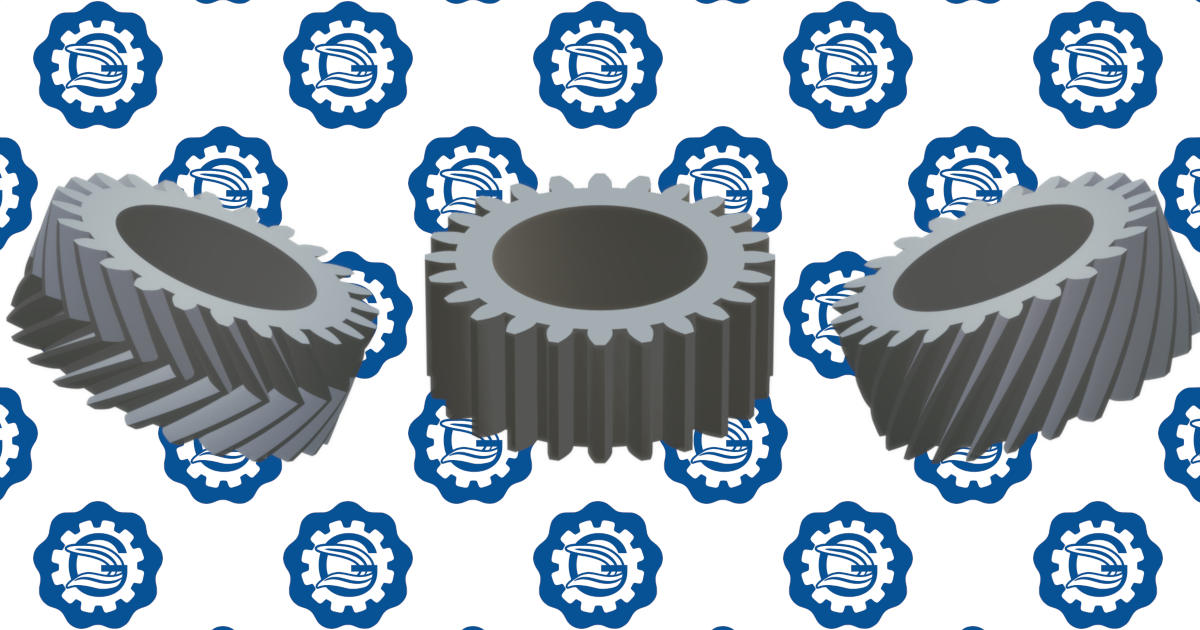
Meanwhile, finding how far I can practically go, I've cut some 3.8mm O.D., and they came out well. Both faces have been cleaned up, but teeth and bores haven't been touched.


Fitzroy

Western Thunderer
They look fantastic Giles, but if you don’t mind me saying I think the pressure angle is a bit large for tiny gears. There is a fantastic book (out of print) by a Lucas engineer that goes through the physics of tiny gears and where the transitions seem to take effect to favour different tooth profiles and pressure angles.
There’s also a really good online 2D gear dxf generator- if any interest I’ll dig out the references.
Cheers
Pieter
 

Giles

Western Thunderer
Thank you Pieter - yes you're bang on! And yes... I should be very grateful for a 2D DXF generator!
 

Fitzroy

Western Thunderer
The gear generator I used most recently to create gears then drop the dxfs into autocad was evolvent (evolventdesign.com) . Having said that STLgears.com looks like it might be very good too.

The book I mentioned was “Gears for small mechanisms” by W O Davis, NAG Press, 1953. Has a lot of interesting things to say about high efficiency clock and instrument gears, and also watch gears and very small power trains. Well worth getting. Very interesting. Generally recommends smaller pressure angles like 14.5 degrees for small gears and then when you get really small to stop bothering with an involute profile.
 

Giles

Western Thunderer
More laser info.... a (model railway) friend got in touch regarding the possible capabilities of the laser cutting extremely fine components from 0.004" stainless steel and phosphor bronze for work, so he came over to have a play.
Professional laser companies had had a go and the results were apparently a dogs breakfast.
The issue was never whether it would cut, but the fact it would likely wrap itself up like a bow with the heat, and delicate bits would burn back.
So the the first two hours were spent getting a decent cut with the minimum heat going in. Easy.
Eventually we tried with a 'real' drawing, which instant did as expected, and curled up like a teeny roller coaster, in the process causing the laser to cut through the wrong parts as it shifted about....
It only takes 5 passes to guarantee cutting cleanly through, so each pass was triggered separately, with a pause of two seconds in between. This was better, but still mountainous.

The next phase was to break the drawing up into small areas to enable separate cutting zones so we weren't cutting the whole thing in one go, and thereby reducing the amount of heat. Again, single passes but now to each zone.
Again, improved, but not enough to be in anyway usable....


We have done our best to not put unnecessary heat in, but now what we want is something to prevent any heat from building up in the metal in the first place. What we use in the jewelery context (and me in the modelling context) to stop remelting of joints or damage to other components is Coolpaste. (Technoflux Heat insulating Paste)


So I made a thin bed of coolpaste (about 1mm thick) with the steel pressed into it, and lasered the job again, and it came out perfectly, ready to have all the little bits pushed out, and perfectly flat with no heat damage at all. So this is how to laser and avoid heat distortion problems.

 

Giles

Western Thunderer
Di wants to do a little more enamelling which she hasn't done for ages, and she asked me if the ComMarker could help out (only fair.....!). She produced a drawing of a rose, which I reprocessed in CAD to do what we actually want. I pushed the limits rather, reducing wall sections down to 0.2mm. As a result of previous test, I had found that copper seems to require about twice as much output power to burn than brass (...ish), so I upped the settings on the laser accordingly.
This was the first burn.


Top